

Google Ads offer a unique opportunity to get in front of consumers when they’re actively searching for a solution or looking to make a purchase. Like it or not, Google is often the default start point of any purchase journey, which means that for many advertisers, Google Ads have become a necessity.
As an advertiser, Google Ads are best deployed when you want to drive consumers towards a particular action, whether it’s a purchase, contact form submission or registration. This makes is easy to track ‘conversions’ and measure Return on Investment (ROI).
For most advertisers, Google Ads will form part of a wider marketing toolkit, and in fact they work best alongside more traditional awareness driving techniques, because you’re more likely to click on an ad for a business you’re already aware of. For sheer targeting, control, trackability and ROI though, they take some beating, and I’ve worked with firms for whom Google Ads account for the lions share of their budget.
The Basics
In case you’re not familiar with Google Ads, here’s a very brief summary…
- They work on a Pay-Per Click basis – so you only pay when someone actually clicks your ad.
- You’ll set a daily budget per campaign. So if you set a £10 limit per day, you won’t spend more than that (and you’ll sometimes spend less if Google can’t effectively spend the budget).
- The system works on an Auction basis – you bid against competitor ads for particular keyword searches, and you can set a maximum cost per click which determines the most you’re prepared to spend. Google’s ‘Smart Bidding’ tool can help you manage this, as it’s a complex area.
- It’s easy to get set up. You’ll need a Google account, and the setup wizard makes it simple from there to launch your first campaign.
5 Easy Wins
1. Spend some time each week adding Negative Keywords to your campaigns. These help weed out those searches you specifically DON’T want to appear for. For example, when we ran ads for our local catering services, we included ‘burgers’ as a negative keyword phrase as it’s not a service we offered. Think of this as a kind of ‘pruning’ process.

2. Use as many Ad Extensions as possible. When you set up your campaign, you’ll be asked to provide Ad Extensions, which is your opportunity to highlight key attributes and features of your business.
They’re only shown when Google deems them relevant to the search, and when space allows, but when applicable they’re a great way to increase the value of your ad (and the space it takes up on the page). Broadly speaking, ads with more extensions get more clicks.
Certain extensions (such as Callouts, Structured Snippets and Sitelinks) are relevant to all businesses, but others will not be appropriate for all.
3. Create a smooth and seamless experience from Ad to Landing Page to Conversion. The branding, imagery, copy and content you use on your Google Ads should be consistent with the landing page you’re driving traffic to. Additionally, any ‘call to action’ such as a contact form or purchase button should be visible ‘above the fold’, i.e. near the top of the page and visible without scrolling down.
4. Segment your customer base, and build Ad campaigns to target each specific segment. Sometimes the segmentation will be obvious, but in other cases you may need to dig a little bit deeper to segment your audience and tease out what differentiates them.
5. Work on your Ad ‘Quality Score’– this is the ranking Google applies to your ads, and it plays a part in determining whether your ads are shown in favour of your competitors. Google helpfully provides a set of recommendations which can improve your quality score, but be careful not to wave them through, you’ll need to judge whether they’re right for your business.
Where to exercise caution
- Start with a small budget and test for effectiveness. It can be incredibly easy to waste money on Google Ads that aren’t targeted well, and it’s easy to make mistakes that can drain your budget (such as forgetting to narrow down your geographical target area) – so start small, make sure you’re seeing results and increase your budget when you’re certain the Ads are working for you.
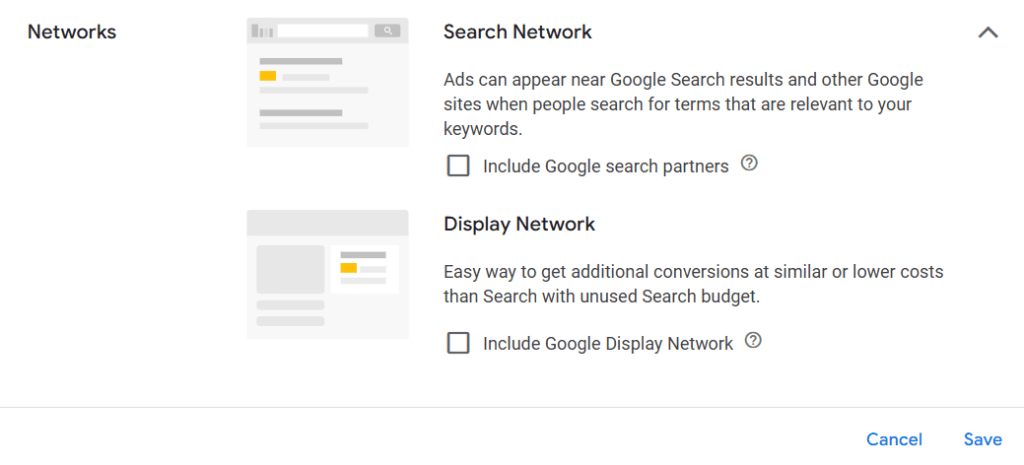
- Google Search Partners and Google Display Network – When you set up your Ads, Google will give you the option of including ‘Google Search Partners’ and ‘Google Display Network’ in your ad placements. This means in addition to Google Search, you’ll pay for Ads across an advertising network which includes any number of other websites. This can work for some businesses, but it’s not for everyone. If in doubt, limit yourself to Google Search and experiment with Search Partners and the Display Network when you’re up and running.
- Make sure your landing page isn’t a weak link. Ensure the submission / contact / purchase process is as smooth as possible. Run test submissions, check your analytics package for bottlenecks and simplify the process as much as possible to ensure your Ad budget is well spent.
Areas to Explore
- Once you’re comfortable with the basics, here are a couple of areas to explore to further improve your campaign’s effectiveness…
- Re-marketing lists help you target customers at different stages of their purchasing journey. If they’ve already visited your website before (for example), there’s a good chance they’re in the mood to commit, so you may want to adjust your messaging and bid strategy accordingly.
- In-Market Audiences – Allow you to target potential customers who are actively in the market for your type of product. Google can help you target customers based on their recent search and purchase behaviour. Those who are already involved in the decision-making funnel are more valuable to you – they’ve shown intent to purchase, and you may wish to adjust your bit strategy accordingly to target these valuable individuals.
It’s definitely possible to manage Google Ads yourself, but it can be time consuming to manage and optimise them. The more effort you put into refining your ads and reporting, the more you’ll get out of them – it’s not a form of marketing you can ‘set and forget’. If you’d like help with setting up or managing your accounts, don’t hesitate to get in touch.

 Rockett Marketing
Leave a comment